Posts

How To Configure Mail Client From "mobileconfig" File ( iOS )

Image
If you want to configure the mail client of your web email address from  mobileconfig  to your ios device. Follow the steps: Download the  mobileconfig  file from your email provider. In my case cPanel Email (->Email Configuration -> Select the email address -> IMAP (application:ios) ->Proceed ).Now you will get  mobileconfig . Upload that mobileconfig file to  uguu.se . And note down generated that link. Other alternatives are: file.io tmpfiles.org file.town takeafile.com imgbb.com Open that link (generated link) from Safari on your iOS device. For example, just message yourself and open the link from your device.✌️ Click on the file. Now opens a screen showing the profile.  Click install -> Type passcode -> install. Now it will ask for the password of your email address. Done. Now you can use your new email profile for sending and receiving emails. Let's stay connected, here is my Twitter p...
Deploy Your React App To GitHub Pages

Image
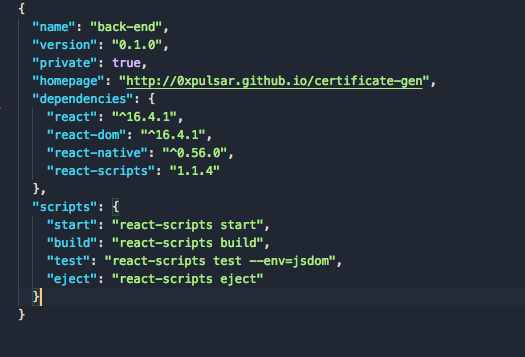
GitHub is not only popular for hosting repositories but also you can host your websites. And it absolutely free. Following are the steps to host your React js App to GitHub. Steps: Create a GitHub repository. Open Terminal (or CMD) on your project folder. Run these commands:  npm run build  . A build folder will be created inside your project. Open  package.json  using any editor of your choice. Paste this line of code: "homepage": "http://<username>.github.io/<myapp>" .  Change "username" with your GitHub username and "myapp" with your repository name. Now the file will look something like this: Add these lines of code to  package.json   "predeploy": "npm run build", "deploy": "gh-pages -d build" Now the file will look something like this:  Save the file after editing. Run this command on the terminal (or CMD)  npm install --save-dev gh-pages  . Now you should ...

Your Ip Address Has Changed. Please Log In Again { Cpanel } Problem [ Solution ]

Image
This problem is because of the change in IP address. This problem can be solved by using any VPN services like Tunnel Bear etc. Install TunnelBear .  Sign UP and log in. Connect  Then try to login in cPanel. Simple solution right. I made this post because I have struggled a lot with this problem. Hope this may help someone. :)

How To Deploy React Js App - Heroku

Step 1 Sign up for heroku . Install heroku CLI Step 2 Open terminal(or CMD) (In this directory) heroku login  (Enter your Heroku credentials) git init git add . git commit -m "initial commit"  heroic create Now you will get one git url (In green colour ) (Copy that Url). git remote add heroku <PASTE THE URL THAT YOU JUST COPIED> git push heroku master heroku open For the repos in gitHub Clone the repo Open terminal (or CMD)  in this directory. git init git add . git commit -m "initial commit" heroku create   Now you will get one git url (In green colour ) (Copy that Url). git remote set-url heroku <PASTE THE URL THAT YOU JUST COPIED> git push heroku master  or    git push heroku master --force   heroku open

How To Move Active Window Using Three Fingers In Mac

Image
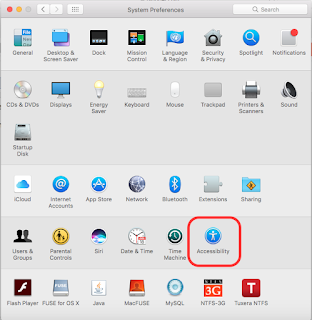
To Enable 'Move Active Window Using Three Finger' Follow these steps: Open ' System Preferences ' > Click  ' Accessibility ' . Click ' Mouse and Trackpad ' > Click ' Trackpad Options. . . ' . ' Enable dragging ' > From the drop down menu select ' three finger drag '. Then click  ' OK ' . Get MacBook Pro Enjoy your  mac  :)

How To Run Glut And Opengl On Xcode

Image
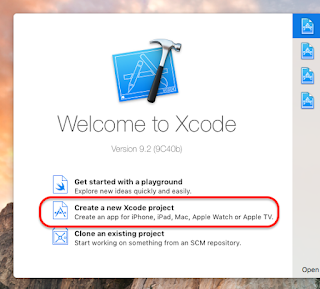
To run glut and openGL on Xcode follow these steps: Open Xcode > 'Create a new Xcode project' . Navigate to 'macOS' tab and select 'Command Line Tool' > Click ' Next' . Fill your project name and other details > Select ' C++ ' as language > 'Next' . Choose the project Location . Click on your project name (at the top left corner). Navigate to build Phases > Click add button '+'. Now  one search window will pop up. Search and add 'OpenGL.framework' and 'GLUT.framework'. Now click on the main.cpp file and add this line (header file adding) > #include <GLUT/glut.h> Sample code available here . My GitHub Profile Now you can start programming on GLUT and openGL :)

How To Download And Install Spotify From Play Store

Image
To install Spotify outside US follow these steps: Open browser and search Spotify. Select "Download Spotify". Select Android - Then you will be redirected to the play store there you can download it. To use Spotify use any VPN  Tunnel bear app.